
How to Verify an OnlyFans Page Before You Pay
Before you pay for an OnlyFans subscription, a short verification routine can save you money and frustration. OnlyFans hosts millions of accounts, and its lack of a discovery feed means you often arrive from a link someone shared rather than from a browse page. This guide explains which signals genuinely confirm that a page is real, active and worth the monthly cost.

Verification is not about suspicion. It is about matching what a profile claims against what can be checked elsewhere. A page that passes these checks is usually run by the person it claims to represent. The platform itself gives you almost no built-in way to tell a genuine page from a copy. That is why third-party ranking and review sites exist, and why checking a few details on your own is still the most reliable method.
Verification signals overview
Some signals are strong because they are hard to fake. Others are weak because anyone can copy them in minutes. Knowing the difference stops you from trusting the wrong clue.
A profile photo, a bio and a banner are weak signals on their own. They take seconds to duplicate. A consistent posting history and matching accounts on other platforms are much stronger.
The table below ranks the common profile signals by how strongly they suggest a genuine page. Use it as a first filter before you spend time on deeper checks.
| Profile signal | Strength | Why it matters |
|---|---|---|
| Bio text and display name | Weak | Copied easily from another profile |
| Profile and banner images | Weak | Reused from public sources or other pages |
| Posting dates and media count | Moderate | Suggests regular activity but can be gamed |
| Matching links on other platforms | Strong | Requires control of the same username elsewhere |
| Consistent history over months | Strong | Expensive and slow to fabricate |
Strong signals share one trait: they cost time or access to maintain. A page that has posted for a year with matching social accounts is difficult to fake convincingly.

Matching the creator elsewhere
Cross-checking is the single most useful step. Take the username from the OnlyFans page and search for it on other platforms. The page should link outward, and the other account should link back.
A one-way link proves little. Anyone can paste a URL into a bio. A two-way link, where both accounts point at each other, is much harder to arrange without controlling both. Watch for small differences in spelling. A swapped letter or an added number often means you are looking at a copy rather than the original account.
The table below shows what a good signal looks like next to a poor one. Read the pairs as a quick comparison guide.
| Check | Good signal | Poor signal |
|---|---|---|
| Username across platforms | Same handle, both accounts link to each other | Similar handle, only one direction links |
| Bio details | Same location and interests as the main account | Bio copied word for word from a public profile |
| Media style | Recognisable setting and editing style | Images that appear under many different names |
| Posting rhythm | Regular dates over several months | Everything posted in one burst last week |
Practical tip: run a reverse image search on the profile photo before you subscribe. If the same picture appears under a different name, treat the page as unverified until you find a two-way link.

Red flags of fake pages
Some patterns show up again and again on pages that turn out to be copies or scams. Each one on its own is not proof, but two or more together should stop you.
- A bio copied word for word from a better-known profile, including the same emoji and line breaks.
- Links that point to a different username than the one on the page.
- Pressure to pay outside the platform, such as gift cards or direct transfers.
- No posts for months followed by a sudden burst of uploads.
- A profile photo that appears under several different names online.
- Messages that ask for your card details directly rather than through the checkout page.
Off-platform payment requests are the clearest warning. Moving the payment outside the platform removes the protections that come with paying through it.
The same caution applies to any page that asks you to verify by entering login details on a second site. That is a credential request, not a verification step.

Activity before payment
Post dates tell you whether the page is alive or dormant. Sort the visible posts by date and look at the gaps. A page updated weekly for a year is a different proposition from one updated twice.
Media counts also matter, but they can mislead. A large count built up in a single week says less than a smaller count spread across many months.
Costs are predictable once you know what you are buying. The list below sets out what a subscription and its extras usually add up to month by month.
- Monthly subscription: typically $4.99 to $15, with most pages charging between $5 and $10.
- Promotional first months: sometimes below $4.99, after which the standard rate applies.
- Pay-per-view messages: charged per item on free and paid pages alike.
- Tips: optional, but often requested for custom requests.
Free pages, where the price is set to $0, earn through pay-per-view messages and tips rather than subscriptions. The lower entry cost does not mean the total monthly spend is smaller. For a starting point, best onlyfans underrated collects free pages.

Price and offer checks
Compare the listed price against what other sources show. Ranking and review sites, including BestOnlyFans, often record current pricing and note when a page has changed its rate.
Subscription prices on paid pages run from a minimum of $4.99 to a maximum of $49.99. There is no base price below $4.99; only promotional first months may dip under that figure.
A few mistakes come up often when people compare offers. The list below covers the ones most likely to cost you money.
- Assuming a discounted first month is the ongoing price.
- Ignoring that pay-per-view and tips sit outside the subscription fee.
- Judging a page only by its headline price rather than its posting history.
- Overlooking the platform fee when estimating what the creator actually receives.
It is also worth knowing how the money moves. The platform takes a 20% fee on subscriptions, tips and pay-per-view, so the creator keeps 80% of everything.

Safety around card details
Payment habits matter as much as page checks. The aim is to keep your card details inside the platform’s own checkout at all times.
If a creator raises the subscription price, auto-renew stops and your existing access lasts until the current paid period ends. That is a feature worth understanding before you set anything to renew.
- Pay only through the platform’s checkout, never by transfer or gift card.
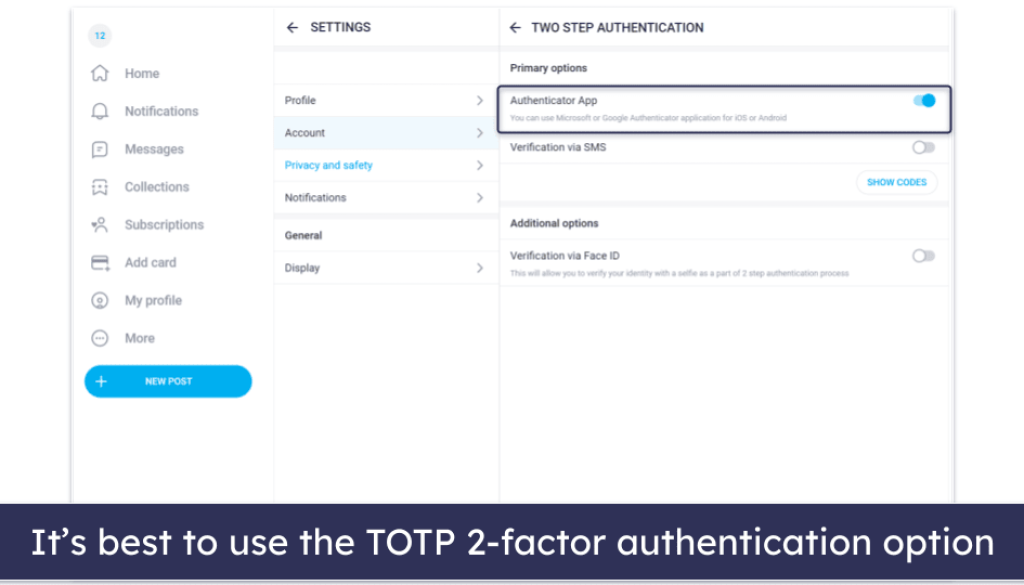
- Turn on two-step authentication on your own account.
- Use a card that allows you to dispute a charge if something goes wrong.
- Review your active subscriptions monthly and cancel what you no longer use.
- Keep records of what you paid and when, in case a charge looks wrong.
Most ranking sites, BestOnlyFans among them, publish guidance alongside their lists because the platform offers no directory of its own. That absence is exactly why cross-checking matters.
The timeline of platform growth is a reminder of scale. A very large user base means copies are common, and it also means the tools for checking a page have improved. Guides such as this best onlyfans underrated overview are useful for comparing pages that rarely appear in mainstream lists.
Verification habits do not need to be elaborate. A username search, a reverse image check and a look at post dates cover most of the risk in a few minutes.
Final pre-payment checklist
Run through the steps below in order. Each one builds on the last, so stopping early still leaves you with useful information.
- Search the username on two or more other platforms and confirm the links go both ways.
- Reverse image search the profile photo and banner.
- Check post dates and look for regular activity over several months.
- Confirm the listed price matches what other sources show.
- Read the bio for copied text or mismatched links.
- Decide on a monthly budget including pay-per-view and tips.
- Enter payment details only on the platform’s own checkout page.
The final step is the one people skip. Payment details belong in one place only, and any request to move them elsewhere is a reason to stop. If a page passes every check, the remaining decision is simply whether the content suits you. Verification only confirms that the page is genuine and active; it does not tell you whether the subscription is worth the price for your own use.
Keep the checklist handy the next time a link arrives from an unfamiliar source. A few minutes of checking is usually enough to separate a real page from a copy, and the habit costs nothing to maintain. One last point on pricing: because the platform fee applies to every payment type, a cheaper subscription does not always mean a cheaper month. Weigh the subscription, pay-per-view and tips together before you commit. Sites such as BestOnlyFans publish pricing notes that make this comparison quicker.
FAQ
How can I tell if an OnlyFans page is genuine?
Look for two-way links between the page and accounts on other platforms, a posting history spread over several months, and a profile photo that does not appear under other names.
What price should I expect to pay?
Paid pages range from $4.99 to $49.99, with most charging between $5 and $10. Only promotional first months may fall below $4.99, and free pages use pay-per-view and tips instead.
What happens if the subscription price goes up?
Auto-renew stops when a creator raises the price, and your existing access continues until the current paid period ends.
How much does the platform take from each payment?
A 20% fee applies to subscriptions, tips and pay-per-view, so the creator keeps 80% of everything paid.